Activities create transparency regarding all interactions with customers, suppliers, and stakeholders. Furthermore, they help to structure internal tasks and complete them on time.
Definition and purpose of activities
Activities are defined business objects that represent interactions with business partners. They document when which employee communicated with which customer. Consequently, a complete history of all contact points is created. This information is available to all authorized users, allowing sales teams to work seamlessly together.
In addition, activities serve the task management function. Employees systematically plan upcoming phone calls, meetings, or internal tasks. The system reminds them of upcoming activities in a timely manner, so important appointments are not missed. Additionally, activities are linked to documents, opportunities, and service requests. This integration connects different business areas within SAP Business One.
The six types of activity at a glance
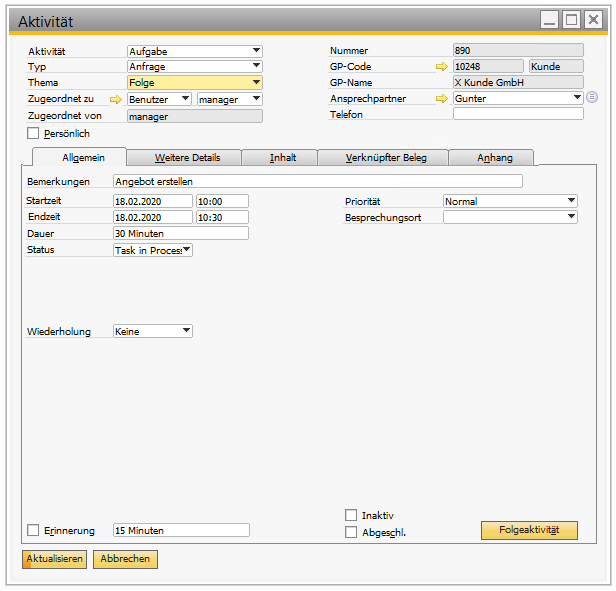
SAP Business One provides six predefined activity types. These cover typical business interactions and enable structured documentation.
Phone call Documents incoming and outgoing calls. Sales representatives record conversation content and plan follow-up calls. Discussion Records personal or virtual meetings with business partners. Participants, agendas, and results can be stored directly in the system. Task Creates internal to-dos that do not necessarily require customer contact. Project managers assign work packages and monitor progress.
Note allows free text documentation of business partners or documents. This type of activity is suitable for informal information that should nevertheless be recorded. campaign Supports marketing campaigns and their tracking. Teams document which customers have participated in campaigns. Other serves as a flexible category that can, for example, include emails.
Users further detail activities via the Type field. In addition, the Subject field can be entered freely or expanded via company-specific categories. This flexibility adapts the system to specific business processes.
Activities in the business cycle: From planning to documentation
Activities accompany the entire customer process – from the initial contact with the interested party to long-term support. In doing so, they support both reactive documentation and proactive planning.
Areas of application in CRM and sales
Sales teams use activities throughout the entire sales cycle. An interested party calls and asks about products. The employee documents the conversation as a phone call activity and notes the customer requirements. Subsequently, he plans a follow-up activity for an offer. The system reminds him at the agreed time, so that the lead is not lost.
Similarly, activities enable the management of daily tasks. Sales managers can see at a glance which team members are handling which customers. Consequently, they can resources Distribute information optimally and identify bottlenecks early on. Furthermore, consistent documentation creates valuable knowledge about customer relationships. New employees can access this history and quickly understand the context of customers.
The connection with Opportunities forms the sales funnel. Each activity shows progress in the sales process. Sales managers analyze how many contacts are required to close the deal. This data improves forecasts and supports informed decisions.
Integration in SAP Business One
Activities can be created in numerous places within the system. This consistent integration prevents media gaps and saves time.
Right within the business partner master data set, users can create and manage activities. The system automatically imports business partner information as suggested values. Consequently, manual data entry is eliminated. Furthermore, employees can immediately see all previous interactions with this customer.
Documents such as quotes, customer orders, or invoices can also be attached to activities. The document data are automatically entered in the Linked Documents tab. This linking creates context – employees understand which business event an activity belongs to. They can also navigate directly to the corresponding document from the activity.
Opportunities benefit especially from activities. Every sales step is documented, making progress transparent. Service calls also integrate activities. Service technicians record customer visits and scheduled maintenance appointments. Activities can even be created for the article itself, with the link appearing on the corresponding tab.
Administration and organization of activities
SAP Business One offers comprehensive features for managing the activity lifecycle. These tools support both one-time and recurring tasks.
Recurring activities and memories
Some customer interactions occur on a regular basis. Sales representatives contact important customers monthly, and service teams perform annual maintenance. SAP Business One enables the creation of recurring activities for such scenarios.
Users can choose between daily, weekly, monthly, or annual repetitions. The system automatically creates follow-up activities at the defined time. Furthermore, changes can be made to individual occurrences without affecting the entire series. This flexibility takes into account special cases such as postponed appointments.
Reminders ensure that activities are processed in a timely manner. For future activities, employees define a reminder. This appears in the notification pop-up and can be automatically displayed when logging in. Consequently, sales teams no longer forget important customer appointments.
Status management and follow-up activities
Activities undergo various statuses during their processing. New activities are activated by default. After completion, employees can mark them as closed. Closed activities cannot be reactivated – this restriction maintains data integrity.
Alternatively, activities can be marked as inactive. Unlike closed activities, inactive activities can be resumed as active ones. This option is suitable for temporarily postponed tasks. Additionally, users can switch between the two statuses as needed.
The Follow-up activity function creates a new, immediately linked activity. For example, an employee documents a phone call and immediately creates a follow-up activity for a personal meeting. This linkage forms the interaction chain. Sales managers can see how customer relationships develop and what steps still need to be taken.
Activities in the Web Client: Management and Analysis
The web client of SAP Business One offers dedicated apps for activity management. These features enable efficient work from any location.
Apps and List views
In the Business Partners group, users find the Apps activity and create activity. The first app is used to manage existing activities, the second to quickly create new entries.
The Activities Manage list view enables comprehensive operations. Users can search, filter, view, edit, add, close, remove, and reopen activities. Predefined views facilitate navigation. My open activities Displays all the active tasks of the registered user in the standard view. All activities provides an overall overview of all system entries.
In addition, the views exist. My activities (open and closed) as well as My closed activities. These filters allow for quick access to relevant information. Consequently, employees do not waste time searching through irrelevant data.
By default, the detail view opens activities in display mode. This prevents accidental changes. The Planning tab contains information about date, time, and recurrence. Users record all time-related parameters there.
Calendar integration and reporting
All time-based activities are automatically recorded in the SAP Business One calendar. This applies to phone calls, meetings, and other activities. Only tasks do not appear in the calendar.
The calendar offers various views. The month view provides an overview of longer periods. The weekly and daily views show details about individual activities. In addition, the group view allows for the planning of team meetings. Sales managers can see their employees' availability and coordinate common customer appointments.
SAP Business One offers dedicated reports for activity evaluation. The report My activities Lists all the activities assigned to the user. This allows employees to check their work status. Activity overview Displays all activities recorded in the system. This comprehensive report can be filtered by numerous criteria – business partners, users, time period, or type of activity.
These evaluations support sales control and employee management. Executives can see which team members maintain how many customer contacts. They can also identify customers who have not been contacted for a long time.
Automation and increased productivity
For medium-sized companies that prioritize efficiency, integration features offer significant added value. SAP Business One supports various automation options.
Outlook integration for sales teams
The Add-On for Microsoft Outlook Integration seamlessly connects both systems. Sales managers and employees manage activities, offers, and opportunities directly from Outlook. In addition, they store email messages and attachments as activities without having to be constantly logged into SAP Business One.
This integration saves time and reduces system changes. Employees work in their usual email environment and still systematically document in SAP Business One. Consequently, barriers to activity recording are reduced. Teams maintain customer data more consistently because the process is integrated into their workflow.

AI assistant meets SAP Business One: Two paths out of the Versino AI shop
One Day, the Whole B1 Ecosystem: Solution Day Connect Comes to Almere / Amsterdam
LATS: Considering several paths simultaneously with AI — and the availability check in SAP B1
SAP B1 10.0 FP2608: Service Layer AI as a transactional layer
SAP Business One 10.0 Feature Package 2608 / FP2608 Part 3
