SAP Business One automatically creates many journal entries as part of financial accounting integration during document entry. This can be illustrated with an example of an incoming invoice where the „Origin“ field refers to the source of the posting. Using a link arrow, the corresponding document, such as an invoice for a car inspection, can be opened directly. In certain cases, this system document may also contain the original document as a file attachment.

Manual journal entries examples
Despite the automated posting processes, it is still necessary to make manual journal entries in certain situations. Typical examples of this are correction entries, annual accounts- or adjusting entries that become necessary as part of company audits, for example. Regular accounting transactions such as salary postings or cash movements are also often recorded manually.
Recording in SAP Business One
A manual journal entry is entered via the Financial Accounting module. The fields in the header area of the journal entry window apply to the entire entry and certain contents from this area, such as the entry text or the reference fields, are transferred to the entry lines as default values. The fields in the table area apply to the individual posting line. They can be customised individually.
Manual journal entry process
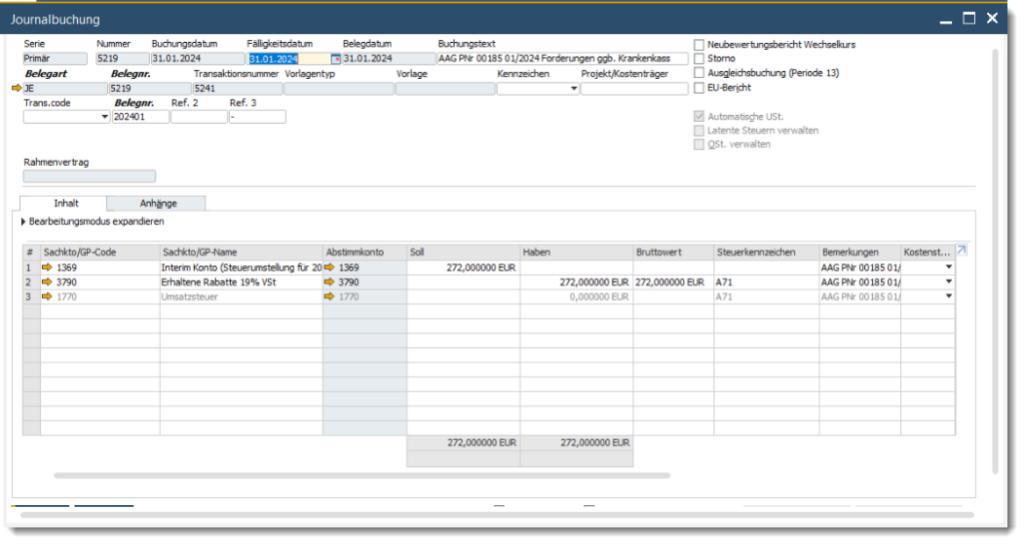
Manual journal entries may be necessary for many different reasons.
Let's assume you have accidentally posted an incoming invoice to the wrong expense account and need to correct it. As the posting period is already closed, it is not possible to re-enter the invoice. Instead, you create a manual posting to transfer the amount to the correct expense account.
When recording a booking, the booking and due dates are set, and the booking text is completed. The „Period 13 adjustment booking“ option is used to separate the booking from the operational business transactions of the financial year and allows for separate reporting in financial statements. The „Automatic VAT“ function is activated by default, but must be deactivated for transfers to tax accounts.
After entering the booking lines, selecting the correct expense account, and setting the adjustment amount, the booking can be added. It is important to note the definitive journal entry number and the abbreviation „JE“ in the „Origin“ field, which indicates a manual journal entry.
This approach illustrates how SAP Business One offers the flexibility to efficiently handle both automated and manual posting processes, enabling comprehensive financial management.


E-Rechnungs-Check der Versino Financial Suite

Versino accounting service

Cash flow planning in SAP Business One: What the Versino Financial Suite does differently

Two free webinars in July: Experience the Versino Financial Suite live

E-Invoicing 2026: What is changing now for SMEs and SAP B1 users

