
With the Feature Package 2602 SAP Business One 10.0 expands the platform at several crucial points. Users get visual process maps and new reports in the Web Client, developers get webhooks in Service Layer, and electronic document delivery processes PDFs with embedded XML starting from Support Package 2511. This article contextualises the innovations and shows what concretely changes in the areas of usability, analytics, and platform.
Read more: SAP B1 10.0 FP2602: Process Maps, Reports und WebhooksProcess Maps: visual navigation through business processes
Process Maps are a new functionality for the visual representation of business processes. They offer guided navigation, enabling quick access to related tasks. By default, SAP Business One 10.0 FP2602 provides two predefined process maps: „Quote to Cash“ for the sales process and „Procure to Pay“ for purchasing. Both maps consistently take into account the defined user authorisations and data responsibilities.
Create your own process maps with the Design Process Map app
Every company has individual processes. Therefore, SAP also provides the „Design Process Map“ app. It offers two methods: users can either adapt a copy of a predefined process map or create a completely new map from scratch. This allows the process maps to be precisely tailored to the specific business processes.
All maps are managed centrally via the „Process Maps App“. This app lists both predefined and user-defined process maps. Within the app, users can create, edit, or delete their own maps at any time.
Crystal Reports and new reports in the Web Client – Feature Package 2602
A new group called „Crystal Reports“ has been added to the Web Client. It allows you to run company-owned reports that are already available in the SAP Business One system. To add or remove reports for viewing, users can utilise the „Edit Homepage“ function. As an example report, SAP mentions the „Monthly Customer Status Report,“ where you can enter parameters for the desired data range and zoom in on details for a more precise analysis.
Dynamic Sales Analysis Report
In parallel, the new „Reports“ group contains two standalone evaluations. The „Dynamic Sales Analysis Report“ is available for all localisations. It uses a hierarchical table that allows business data to be grouped and summarised across multiple levels in rows and columns. This way, combined key performance indicators can be identified, such as the best-selling products amongst the most profitable customers over rolling periods like years, quarters, or months.
This report also allows for a detailed breakdown of data. Users can view the data breakdown of a selected cell directly and seamlessly jump from there to the underlying source documents and transactions. The web clientThis version also offers two significant enhancements over the original variant: considerably more flexible filter conditions and a much wider selection of selectable fields.
Profit and Loss Statement Report
In addition, SAP provides the „Profit and Loss Statement Report“. However, this report is only available for the DE, UK, and US localisations. Here too, the drilldown works directly from a selected cell, in this case into the underlying journal entries.
Webhooks in the Service Layer: Real-time Notifications for Developers
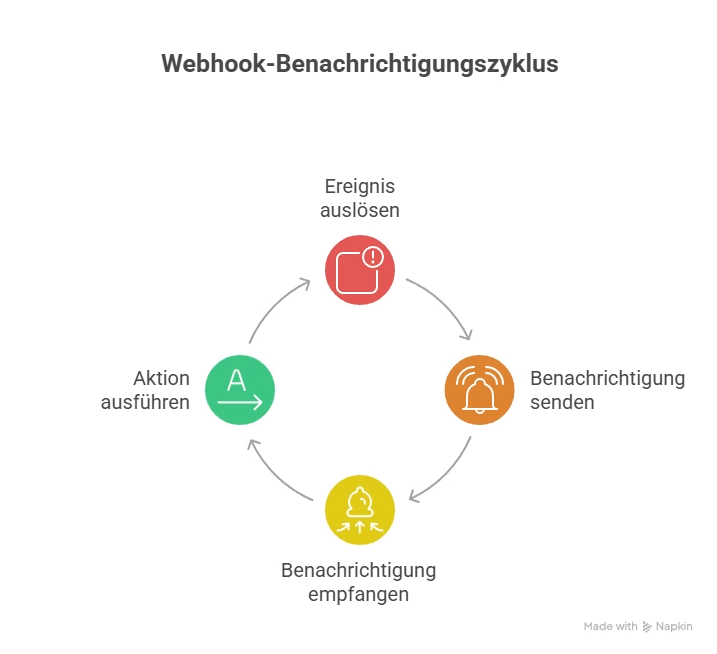
A core platform extension concerns the Service Layer. It now supports webhooks for instant notifications of specific system events. By subscribing to events, webhooks can automatically trigger actions in connected applications. An example is the creation of a customer order: as soon as the order is created, the webhook receives a notification. From this notification, developers can retrieve the complete details of the associated document via the Service Layer APIs.
Supported operations and objects
The advantage for developers lies in the broad support of triggering events. All data modification operations can trigger webhook notifications, provided the relevant events have been subscribed to previously. Specifically, SAP supports Create, Update, and Delete operations. These operations apply equally to standard business objects, user-defined tables (UDTs), and user-defined objects (UDOs).
Step-by-step setup
For developers to be able to use the webhooks, the Webhook Messenger Service must first be installed and started in the SAP Business One environment. Administrators then activate the webhooks in the Configuration Settings. Technical implementation also requires setting up a webhook endpoint that receives and processes the sent notifications. Once the endpoint is ready, event subscriptions can be created and the subscribed events triggered in the system. Important note: The correct processing of notifications must be manually verified.
Electronic Documents: PDF with embedded XML
There is also a relevant new development in the area of Electronic Documents. As of Support Package 2511 for version 10.0, the new protocol „PDF with XML attachment“ is available in the „Electronic Documents“ tab of the Document Settings. With this configuration, sales documents such as the AR Invoice can be exported manually or automatically as a PDF. The exported PDF contains the document data additionally in the XML— Format as a direct attachment.
The XML is located in the „Attachments“ tab of the created PDF file and is visible in external programs such as Adobe Acrobat. This mechanism serves for data exchange with the ERP systems of business partners: recipients receive a human-readable PDF and at the same time the machine-readable data in a structured form.
What remains of Feature Package 2602 hang
With FP2602, SAP Business One 10.0 connects three key areas. Process Maps and the Design Process Map app elevate usability to a process-driven level, anchoring authorisations and data responsibilities within navigation. The Dynamic Sales Analysis Report and the Profit and Loss Statement Report bring flexible analyses with drilldowns directly into the Web Client, enhanced by Crystal Reports integration via Edit Homepage. Webhooks in the Service Layer open the platform for event-driven integrations with external applications, and the new „PDF with XML attachment“ protocol from SP 2511 simplifies electronic document exchange with business partners.

SAP Business One 10.0 Feature Package 2608 / FP2608 Part 3
SAP Business One 10.0 Feature Package 2608 / New Features & Functions – Part 2
SAP Business One 10.0 FP 2608 / New Features & Functions – Part 1
SAP B1 10.0 FP2602: Process Maps, Reports and Webhooks
New in SAP B1 10.0 FP2602: Inventory & Logistics, Production, Banking
