The careful management and structuring of article groups is crucial to ensure efficient financial accounting and ensure precise analyses. In SAP Business One in particular, they facilitate the management and creation of articles, support efficient reporting and improve inventory management.
Article groups as a well thought-out structure
A clearly defined structure of article groups not only allows different article types to be analysed later, but also enables efficient searching and narrowing down. This is particularly relevant when different Tax rates or separate accounts are used in financial accounting. Companies should therefore set up a well thought-out structure from the outset.

Faster article creation
One advantage of groups based on articles in SAP Business One is the ability to use default values for fields when creating new articles. These default values, such as unit of measurement, Supplier and valuation method are automatically adopted when a new item is created. This saves time and increases the consistency of the data in the system.
Effective inventory management through article groups
By using article groups, companies can also optimise stock management. Items in a particular group can be selected and specifically processed for stock counts. This improves the accuracy of stock data and reduces the administrative burden.
Setting up article groups
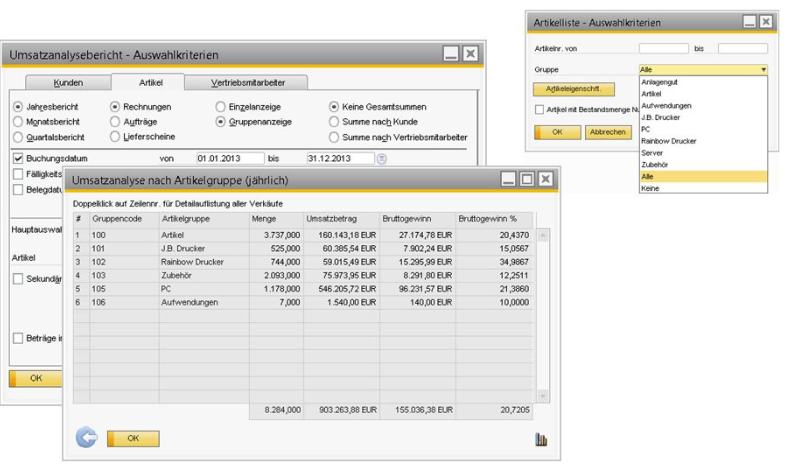
In SAP Business One, the article groups can be found under administration > Definition > warehouse management. Various item groups can be created here, such as hardware, software, services, spare parts, accessories, raw materials, packaging material and miscellaneous. If required, each group can contain a number of standard specifications that are automatically assigned to the newly created items. These include, for example, standard accounts, planning methods or procurement bases
Advantages of the article group structure
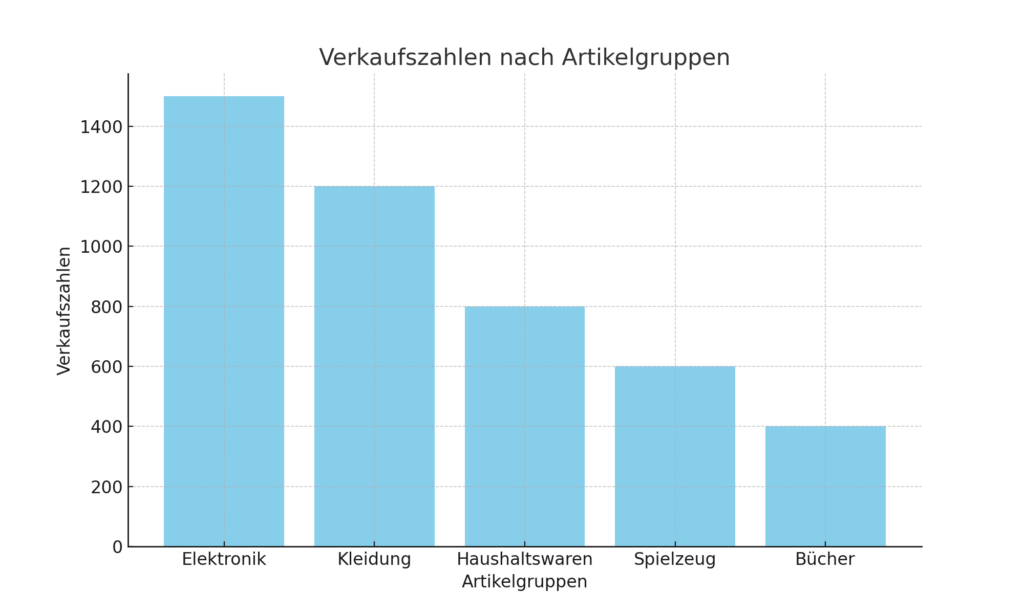
Items of the same type can receive similar discounts or mark-ups by being assigned to an item group. This is particularly useful for promotions or for calculating contribution margins. The assignment to article groups makes it possible to analyses and categorise the items accordingly. For example, you can analyse which types of customers buy which items, which items are sold in which regions and which combinations of items sell well.
Analyses and evaluations
Structured management of the article groups makes it possible to carry out detailed analyses, e.g:
- Sales development of the product groups
- Contribution margins of the individual articles
- Profitability of certain product groups
- Purchasing behaviour of different customer types
- Regional sales trends
In SAP Business One, an article group can be used as a selection criterion in many reports. This allows you to analyse the data in detail and supports management in making decisions. In sales and purchasing analyses, for example, you can display totals by item group, which provides a clear overview of the performance of individual product lines.
Conclusion
Overall, the structuring, filtering and analysis options of article groups help to ensure that reports can be made clearer, more target group-orientated and more meaningful. A well thought-out grouping of articles is therefore an important factor for high-quality reporting.

AI assistant meets SAP Business One: Two paths out of the Versino AI shop
One Day, the Whole B1 Ecosystem: Solution Day Connect Comes to Almere / Amsterdam
LATS: Considering several paths simultaneously with AI — and the availability check in SAP B1
SAP B1 10.0 FP2608: Service Layer AI as a transactional layer
SAP Business One 10.0 Feature Package 2608 / FP2608 Part 3
