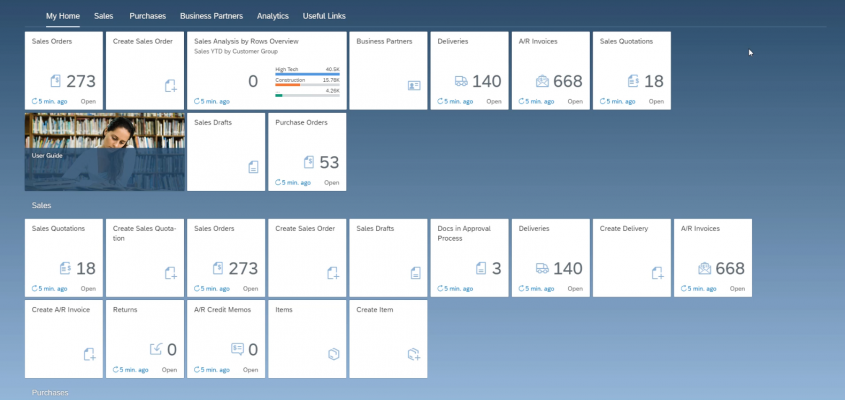
The new SAP Business One - Web Client, there is a further alternative interface for use on PCs and mobile devices. The UI is an independent development in terms of operating concept and customisability. The Web UI is available exclusively for the HANA version of SAP Busines One.
SAP Business One Web Client in a uniform design
After SAP pursued different paths with its ERP applications in previous years, the trend is now moving back towards a common foundation. This can also be seen in the new web client for SAP Business One. The design is called „Belize Deep“ and is also used in other SAP software. Visually, tiles dominate, providing an overview of important company information on the start screen. Behind this lies modern technology that also supports 4K monitors.
Personalised presentation
The aforementioned tiles on the home screen can be personalised per user. This allows each user to display the important information they want to see after launching the SAP Business One Web Client. Groups can be formed for structuring purposes, which can be shown or hidden collectively. Furthermore, there is the „Me-area“ where the most recent and most frequent personal functions are displayed.
With menus and searches to the functions
The „Enterprise Search“ search engine is also available, which provides access to the content and functions of SAP Business One, in addition to the header menus and the app finder. The search results of Enterprise Search can subsequently be analysed using structural filters. Furthermore, filtered search results can be saved and reproduced as a filter set.
Information from Analytics
Of course, the "Analytics" area should not be missing. The results of the analyses from sales, purchasing, customers, suppliers and finances are always displayed prominently and up to date. Clicking on the display of the key figures takes you directly to the details behind them.
More on the subject:

One Day, the Whole B1 Ecosystem: Solution Day Connect Comes to Almere / Amsterdam
LATS: Considering several paths simultaneously with AI — and the availability check in SAP B1
SAP B1 10.0 FP2608: Service Layer AI as a transactional layer
SAP Business One 10.0 Feature Package 2608 / FP2608 Part 3
SAP Business One 10.0 Feature Package 2608 / New Features & Functions – Part 2
