When a business partner is both a customer and a supplier, it sounds like a comfortable situation. You know each other, you trust each other, and at the end of the month, you simply „offset“ the amounts. In practice, this „simply offsetting“ is one of the most common sources of unclear balances in accounting. Furthermore, it leads to incorrect reconciliations and discussions with the tax advisor.
This article explains why this is the case — and how the Versino Financial Suite systematically solves this problem.
Read more: Netting in SAP Business One: Was die Versino Financial Suite anders machtThe classic problem: debtor and creditor in one person
SAP Business One works with separate reconciliation accounts for receivables (debtors) and payables (creditors). This is intended by commercial law: § 246 para. 2 HGB generally prohibits the netting of assets with liabilities. This means that receivables and payables may not simply be offset against each other in the balance sheet. They must be shown separately.
So far, the ideal world.
In day-to-day operations, it looks different. A tradesman who buys from a building materials dealer and sells services to the same building materials dealer suddenly has €12,000 outstanding on the debtors side. At the same time, they have €9,000 on the creditors side. Internally, nobody wants to make two payments – they want to offset them internally. This way, only the difference of €3,000 will actually be transferred or received. At the same time, they want to document what happened cleanly for accounting purposes.
This is Netting — and it does not conflict with the prohibition of set-off under commercial law, as long as one understands it correctly. The prohibition of set-off concerns the Balance sheet, not the operational payment settlement. Operative netting is permissible if both parties agree and the settlement is properly booked. The key lies in the word „booked“: it requires a clear booking trail, not an implicit back-end reallocation.
The pain of SAP Business One without netting support
In a standard SAP B1 system without specialised netting functions, this often happens in practice: The accountant posts a manual payment on the accounts receivable side and another on the accounts payable side. Additionally, they offset the difference via a journal entry. At the end, this results in three postings that they themselves cannot reconcile after six months. Or the settlement remains half open. This is because the discount periods were different and no one had the time to calculate it cleanly.
The open items image is unclear. The open items list at the accountant's shows items that were long since „cleared“. Furthermore, with the next balance confirmation, both sides are faced with a puzzle.
What the Versino Financial Suite Netting function does
The Versino Financial Suite solves this problem with its own netting component. This is directly integrated into SAP Business One and accessible via the menu Versino Financial Suite > Netting Overview resp. Netting agreements accessible.
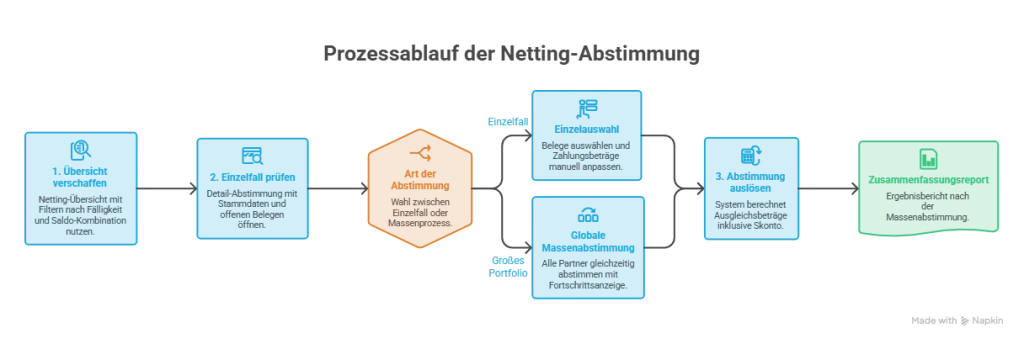
The procedure in practice:
1. Get an overview. The netting overview shows all business partners who have open debtor and creditor balances simultaneously. A filter by due date and by balance combination (debtor only, creditor only, or both) is available. Additionally, there is an optional cash discount consideration. This helps to quickly narrow down the relevant cases.
2. Examine the individual case. A double-click on a business partner opens the detailed reconciliation with four areas: Debtor master data, Creditor master data, open debtor documents, and open creditor documents. Each open item is visible individually — document type, document number, posting date, due date, cash discount percentage, and outstanding amount. Payment amounts are editable, and partial reconciliations are possible.
3. Trigger voting. Upon selecting the relevant documents, the system automatically calculates the clearing amounts, taking into account — if enabled — discount periods and amounts. For large portfolios, there is also a Global mass vote available: all votable business partners at once, with progress indicator and summary report.
4. Bookings are automatically generated. The system starts itself:
- One incoming payment to offset the selected creditor documents, posted against the configured creditor netting account
- One Outgoing payment to balance the selected customer documents, booked against the customer netting account
- One Journal entry for differences, which reconciles the netting accounts and books rounding differences to the configured default netting account
Each of these bookings carries the configured netting reference text and is linked to the original documents. This provides a complete booking trail – for internal audit, for the tax advisor, and for a potential year-end audit.
The accounting logic behind it
What the system is doing in the background is technically sound: the receivables are not „overwritten“ by the payables – they both balanced, Each on its own voting account. The netting accounts function as pass-through positions. In the end, the debtor account is zeroed out and the creditor account is also zeroed out. The actual payment amount flowing – the difference – is clearly documented.
This corresponds to what good accountants have been doing manually in several steps until now. The difference: it happens consistently, with configurable accounts and reference texts. In addition, there is logging, which is traceable even months later.
The netting history shows all netting transactions chronologically, including the date, journal entry ID, amount, and difference documentation. Individual netting transactions can be cancelled, with the audit trail remaining intact.
Discount: the underestimated stumbling block in netting
A point that the Versino Financial Suite Netting function explicitly addresses and which often causes errors in manual reconciliations is: discount.
If there is an outstanding balance of EUR 10,000 on the accounts receivable side and the customer could still claim a 2 % discount within 8 days, whilst EUR 8,000 is due on the accounts payable side under different terms, manual offsetting quickly becomes confusing. However, the system recognises the discount terms from the payment terms. It automatically calculates discount amounts based on due dates and posts the discount amounts separately to the configured discount accounts from the DATEV configuration.
Who is this feature relevant for?
Companies that have several hundred business partners and among them regularly having two relationships — also debtors who are also creditors — will immediately see the practical benefit. This is not uncommon in crafts, manufacturing, services, and trade alike.
For businesses that Exclusively internal bookings Without using a DATEV tax firm and where dual relationships are the absolute exception, the setup effort — configuration of netting accounts, reference texts, reconciliation accounts — may be greater than the immediate benefit. The function unfolds its potential where the tax advisor finds neatly structured open item lists at the end of the year. There, they don't have to manually reconstruct what was internally „offset“.
Netting is not a fringe issue
Netting is not a fringe issue — it is an everyday accounting finding in any company with established business partner portfolios. The Versino Financial Suite reflects this consistently: not as a workaround, but as a function with configurable accounts, logging, and reversal options. That is the difference between a system that works with the accountant and one that forces the accountant to work around the system.
E-Invoice check by Versino Financial Suite

Cash flow planning in SAP Business One: What the Versino Financial Suite does differently

Netting in SAP Business One: What makes the Versino Financial Suite different

Trial Balance in SAP Business One: What the Versino Financial Suite does differently – and why tax advisors notice

Versino Financial Suite V09.2025 for SAP Business One

New webinars: Versino Financial Suite

Secure liquidity with SAP Business One