We can guess: in the coming times, it will be a bit more difficult to find new customers and sales opportunities. Opportunity management is gaining in importance right now. This does not only mean the implementation in software functions, but a whole strategy to approach sales methodically.
Opportunity management- too complicated
ERP systems, such as SAP Business One, should not actually be called that. The term ERP is too short-sighted, as business software for small and medium-sized enterprises is a CRM It is installed. We will not further discuss the advantages and perhaps disadvantages compared to a separate ERP and CRM world here. That would fill another article. At the same time, SAP B1 has a sales control tool that often goes unnoticed even in some CRM systems: Opportunity Management. Many smaller companies seem to find it too time-consuming and complicated. „I still have those few customers and prospects in my head.“
„I can't win customers based on a standard formula.“ You often hear statements like this when it comes to introducing features related to opportunities.

Overview and method
It is a good idea to first visualise the function of opportunity management. The task is to obtain an overview of the sales opportunities. The aim is to support an optimised sales process. Within this process, the sales department approaches a deal by collecting targeted information and taking steps based on this.
It is actually helpful Business SoftwareThe booklet is a guide to the methodological work.
We take a look at what SAP Business One has to offer here.
SAP Business One - the preparation
In order to be able to use the opportunity management functions in SAP Business One sensibly and comprehensively, you should create some structures in advance (if they do not already exist).
These include:
Sales or distribution areas
This is where you define the areas in which you carry out your sales activities. This includes the locations of your customers and prospective customers. This allows you to analyse or manage offers according to your territory structure in later evaluations. Each opportunity can accordingly also be assigned to such an area.
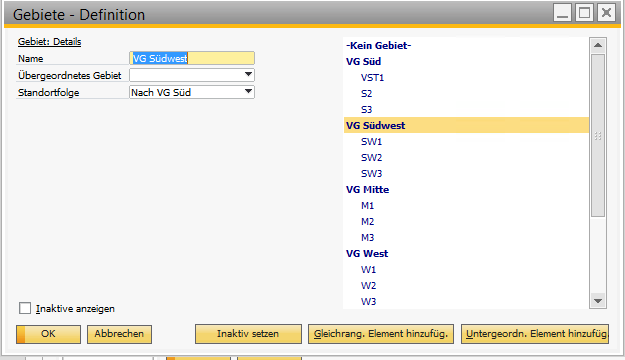
SAP Business One - TerritoryAs is often the case, „less is more“ applies here. Don't get too granular with the territories to avoid hindering meaningful analysis. The territory for the respective business partner can be defined in the business partner master record. When creating an opportunity, the territory is then suggested accordingly, but can still be changed.
The sales stages in opportunity management
A lot of your experience, your industry and your company are involved here. The sales stages determine which steps your sales process should ideally go through. This certainly varies from company to company. However, the general idea is that the stages build on each other and that an estimate can be made for each stage as to how likely it is to close the deal. Accordingly, a percentage probability is assigned for each stage, which can be used for calculations.
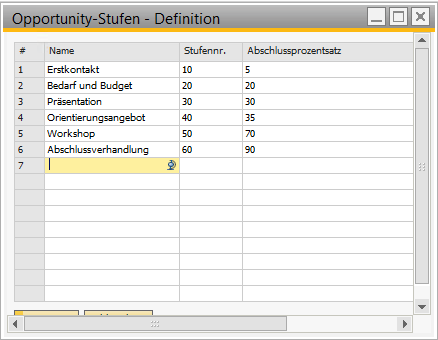
SAP B1 -Opportunity - LevelsThis is also an organisational and disciplinary aspect for the sales. This is because the sales department should actually carry out its activities according to the agreed stages. This standardised approach allows deviations and trends to be identified later during accompanying evaluations.
A standardised approach also makes it easier to manage your sales.

SAP B1 Opportunity AnalysisSAP Business One - the opportunity
Now you are ready to create your sales opportunities. You can enter many details and data here, but you don't have to. Think carefully about what makes sense and what you want to ask of your sales team. Information about areas of interest, partners and competitors is certainly interesting. Opportunity management thrives on standardisation, but also on the complete collection of data that is considered important. The more you demand of yourself and your employees here, the more difficult it will be to maintain discipline.
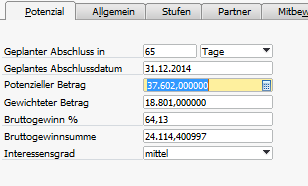
SAP B1 Opportunity Basis DetailsBasically, the few details in the start window of the opportunity are sufficient. Here you enter how many days you want to close the deal in, how high the closing contribution will be and how high this amount will be depending on the probability of closing. The gross profit in per cent and the gross profit amount are based on the user's input, as is the level of interest.
This lays the foundation for reports that provide a quick overview of the potential of sales opportunities.

SAP B1 Opportunity ReportsSAP Business One - Opportunity Levels
A lot of information in the opportunity object in SAP Business One is more important for statistics and analyses. Maintaining the stages, on the other hand, is important for the ongoing process. On the one hand, the stages virtually guide you as to the next logical step you should take with your (potential) customer. It is the operations centre from which every further action can be started. Activities can be created directly from each stage in order to plan or document them. The usual deep integration into SAP Business One makes work much easier here.
SAP B1 Opportunity Message 1This allows each line and stage to be linked directly to documents such as quotations, orders or invoices. The associated figures update the values of the opportunity as required.
The dynamic opportunity analysis
A slightly different view of the Sales pipeline is provided by the dynamic opportunity analysis. It makes it possible to gain a dynamic insight into the development history of sales opportunities. The enquiry can be carried out from different perspectives, be it in relation to customers, groups or employees.
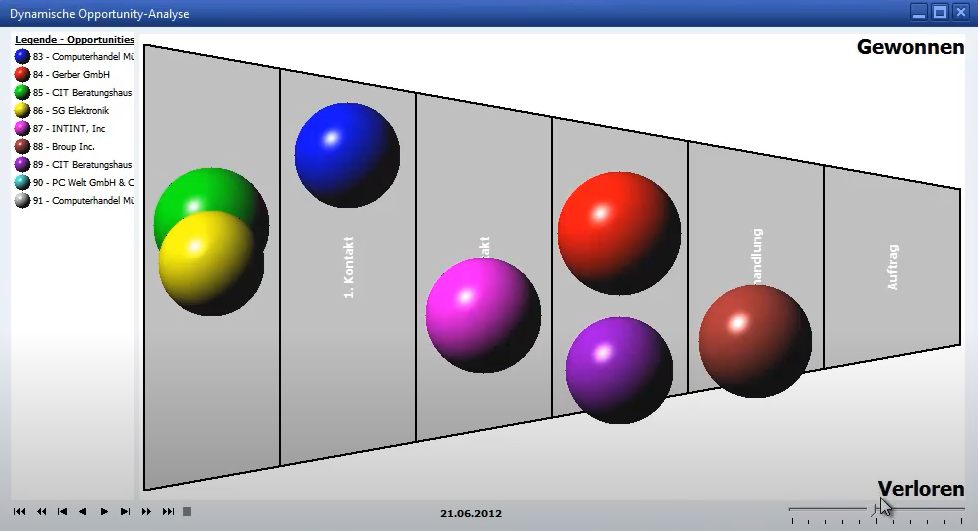
SAP B1 dynamic opportunity analysisGetting more out of opportunities
With everything we have described here, we have still only scratched the surface of the possibilities. As with everything, it's time to set off. The tools are often at hand - you just have to use them.
more on the subject

RPA in the ERP environment: increasing efficiency through digital process assistants
Data quality & AI : AI can only be as good as your data
AI-ERP transformation basics and AI governance
Time to tidy up - optimise ERP software now (Part 4)
Time to tidy up - optimise ERP software now (Part 3)
