Depending on the industry, the organisation of personnel and the associated costs play a decisive role in times of crisis. Optimising staff deployment and keeping an eye on all staff-related information is a task where SAP Business One can also provide support.
Questions around the staff
How can I use the existing personnel resources optimally? Do I have scope for short-time working? Which qualifications can I utilise and expand where? What can I automate? These are questions that many entrepreneurs are now asking themselves.
Often little known: SAP Business One contains functions that can help to better organise processes relating to employees.

Data Personnel SAP Business OneThe master data of the employees
First of all, it should be mentioned that it is of course possible to base data in SAP Business One. The level of detail in the data relating to personnel is quite extensive. Even in the standard version without any user-defined structures. For example, all data relating to personnel that is required to pass it on to a personnel calculation programme is recorded. However, the data required for the internal organisation and management of employees is also recorded.

Organisation and hierarchy
The data concerning the organisation helps to define the hierarchy.
This will then allow processes and Workflows coordinate. The result of the structuring can also be displayed in interactive views. This can be an organigram of the complete organisation. Or it will be individual employees with its structure.
However, the employee hierarchies also provide the basis for overviews and Reports. The basis for more complex commission models can also be stored in this way.
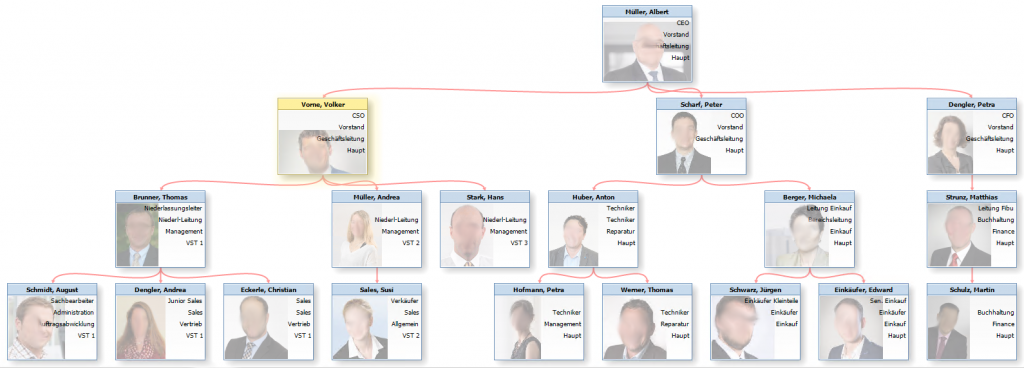
Organigram SAP Business OneRoles and teams for staff
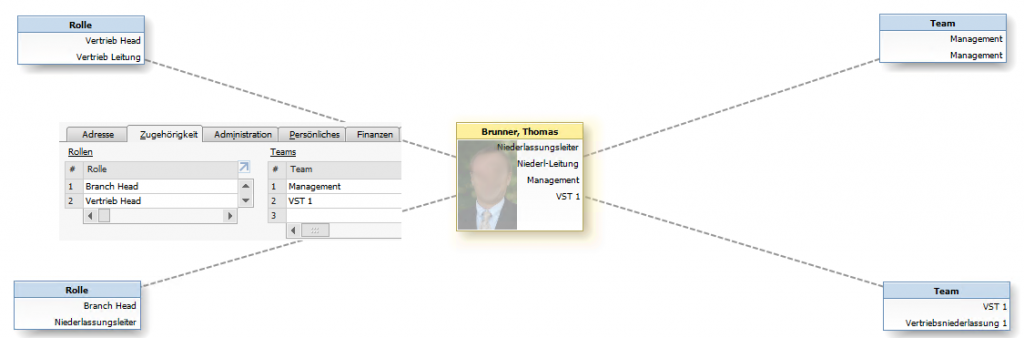
In addition to hierarchies, employees can also be grouped into roles and teams. These structures are also used for control and evaluation. SAP Business One answers questions such as:
- How much costs do my employees generate with the mechanic role?
- How much turnover does my sales team West make?
- Number of absences of the Teleagent role in my Internal Sales team?
- etc.
Roles & Teams in SAP Business OneWorking hours and absence
In addition to structures for personnel, we naturally also need the working times and absences of employees. Every user can also record this data directly in SAP Business One. The entries in the work sheet not only record the type of activity and the corresponding article. Reference can also be made to internal project management. However, this is worth a separate chapter.
more on the subject

RPA in the ERP environment: increasing efficiency through digital process assistants
Data quality & AI : AI can only be as good as your data
AI-ERP transformation basics and AI governance
Time to tidy up - optimise ERP software now (Part 4)
Time to tidy up - optimise ERP software now (Part 3)
