You have to look a long time to find this Corona crisis something positive out of it. If there's one thing, it's that you suddenly have the freedom to tackle projects that you've been putting off for a long time. One of these projects is to realise your own ERP system optimisation. In the second part of this series, we look at the unused functions using the example of SAP Business One activities.
Most ERP functions lie idle
Experience shows that companies, on average, only use about 30% of their ERP software's functions. Now, it's already the case that ERP systems often offer a very broad range of functionalities. And some of these features and modules are indeed for areas that simply don't exist in one company or another. At the same time, however, there are areas that were originally planned for implementation. In the „hustle and bustle“ of the implementation project, they got lost, were postponed until later, and ultimately forgotten. Processes or entirely new business areas also emerged long after the ERP implementation and have not been integrated. Last but not least, the software has also grown and new functions have been added via updates.
Using the example of SAP Business One
Let's take SAP Business One as an example and use the standard functions available there to find out where there is potential for optimisation. In doing so, we first work our way along the Order 2 Cash process. This is only a small part, but one that is essential in almost every company.
Activity management
It is now very important for companies to keep track of who is doing what in the organisation. Yes, there are certainly many approaches and lots of software that document and track processes. And many companies rely on modern (sometimes hyped) tools that work completely independently alongside the integrated Business software run. And yes, perhaps there are tools that are simply „nicer“ or „sexier“ than the sober interface of an SAP ERP. However, behind the inconspicuous small window of an activity lies a powerful tool for documenting and controlling processes.
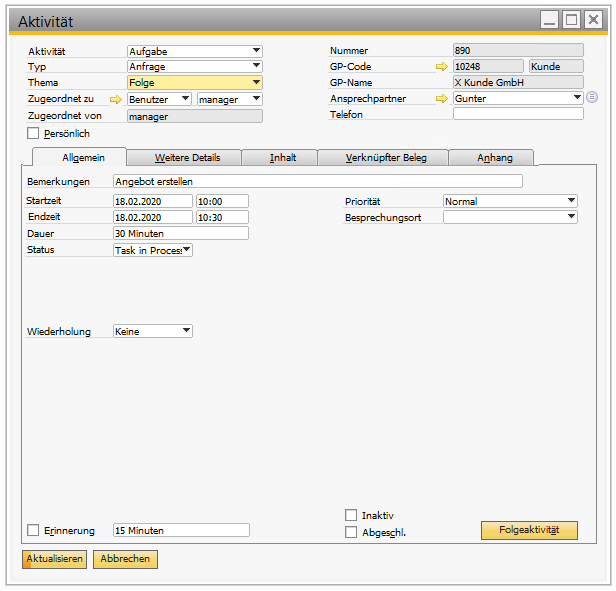
No matter which interaction with a business partner can be documented with an activity. Whether these are internal processes, telephone calls, tasks or meetings, everything is stored in a structured manner. The decisive advantage of doing this within the ERP application The integration and interaction with the system's business transactions and documents is a major challenge.
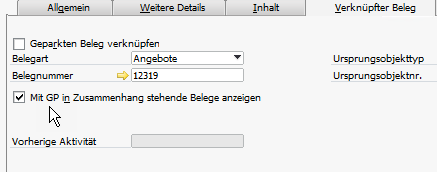
Activity - Linked documentsAlso work with activities in add-ons
Complete workflows can be traced via follow-up activities. With the customising tools of SAP Business One, workflow control can be established with little effort. This goes so far that such activities can be created from applications outside the ERP software in order to trigger their further processing. Moreover, most add-on manufacturers have integrated the activities deeply into their processes. This means that projects in MariProject with activities. At CKS-DMS documents can be controlled with activities. Boyums CRM for Outlook allows you to create activities directly from Outlook.
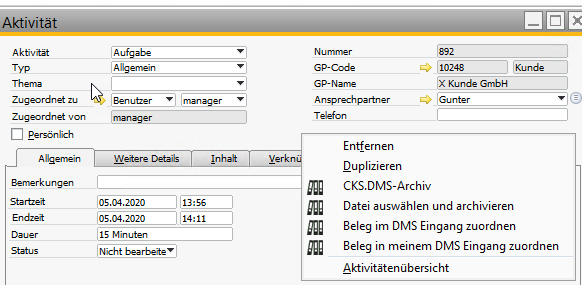
Archive document for activity 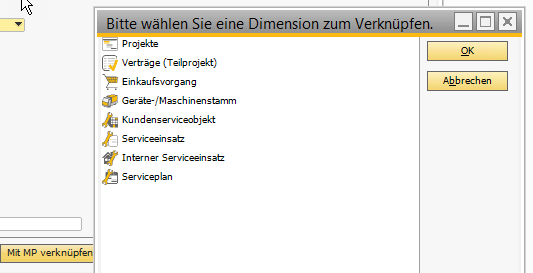
Link activity with MariProjectOnce recorded in the system, activities can be assigned to individual or multiple employees for processing. Overviews of your own and/or your employees' activities ensure that an overview of the workload is maintained. Tasks can be created for resubmission.
Transmitting and receiving activities to/from the „outside world“
Activities can be exchanged with the environment in various ways. This allows tasks and information to be sent to the SAP Business One Mobile App forward and receive updates. The integration of e-mail systems allows e-mails to be created as an activity including attachments.
There are almost no limits to the imagination of integration scenarios with SAP Business One that use activities as an organisational and control tool when using the SAP Business One integration platform. Here, any number of triggers can ensure that activities initiate or trigger actions in other applications.
The requirements
As with everything in ERP software, it is also important to create clear standardised structures for activity management. The following questions can be addressed:
- What different types of activities are there in the company
- What topics can these types deal with
- Who can create activities
- Who can you create activities for
- Which activities and follow-up activities should be created within a workflow
- Which analyses should be created from the activities
- Who should be informed about the creation or modification of an activity and how?
- Which activities should be created automatically
- With which applications and apps should activities be exchanged?
more on the subject

RPA in the ERP environment: increasing efficiency through digital process assistants
Data quality & AI : AI can only be as good as your data
AI-ERP transformation basics and AI governance
Time to tidy up - optimise ERP software now (Part 4)
Time to tidy up - optimise ERP software now (Part 3)
