Version 05.2026 of the Versino Financial Suite brings two new features that directly address time wastage and system limitations that cause pain in daily work: The DATEV export now runs across multiple months in one go – what previously cost twenty to thirty minutes now takes around two minutes. And the Versino Financial Suite Dashboard is now available as a standalone application, without needing to fully start SAP Business One.
In addition to this, several positions in the reporting department and in master data have been expanded. What exactly - and where this applies in everyday life - is explained further down.
Read more: Versino Financial Suite Version 05.2026: Was sich geändert hatThe DATEV export: from twenty minutes to two
Anyone who regularly creates DATEV exports from SAP Business One knows the ritual. Month after month, selecting individually, exporting, waiting for the completion message, then the next month. In a financial year with twelve periods, this often amounts to twenty to thirty minutes of pure waiting time – plus the error rate, which increases with the number of manual steps.
Version 05.2026 breaks this: The export is now running Month-over-month with automatic batching per month. This means, specifically: one run for the entire financial year, the monthly stacks are created automatically – finished in around two minutes. What used to be an evening ritual is now a background task.
This is no small matter for the handover to the tax advisor. Those who work with a DMS or CANDIS will also benefit from the newly integrated Proof linkThe exported posting entry now carries a direct reference to the original document. When inquiring, the tax advisor no longer gets lost in a jungle of booking entries but is taken directly to the document.
What else is new with the DATEV export
The configuration page has been expanded. Anyone who wants to transfer KOST1 and KOST2 – cost centre and cost carrier – to the DATEV export can now set this directly, without detours. Also added are:
- General reversalCancellation bookings can be processed using configurable logic.
- Cancellation receipt numberThe cancellation booking record now includes the document number of the original – relevant for tax advisor traceability.
- Service dateCan now be passed on in the export, which is often required for VAT audits.
- Extended log fileThe export log has been expanded. Those who need to trace what was exported and when, and why something was missing, now have more substance in the log.
The Financial Cockpit as a standalone application
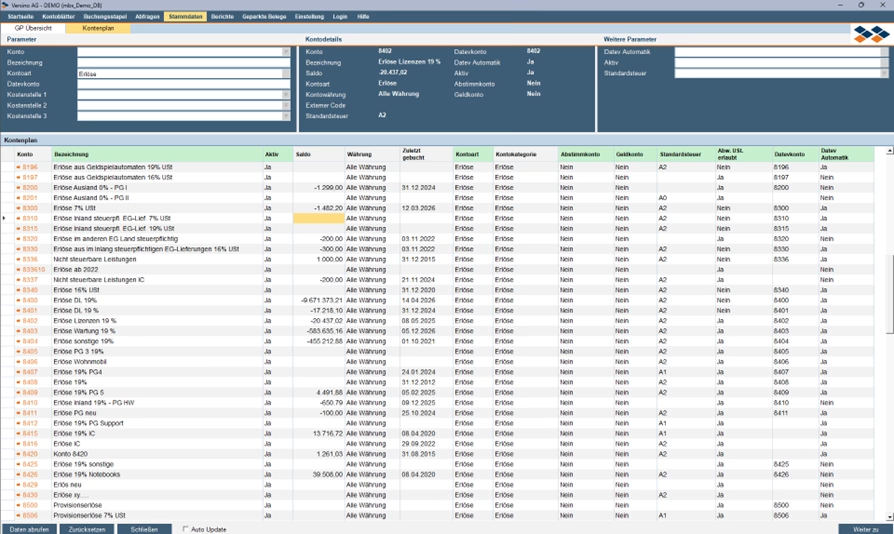
The Versino Financial Suite Dashboard has been around for a while – those familiar with it appreciate the ability to look up general ledger accounts, track postings down to the document, and have their own query analyses directly in view. The new standalone version decouples the cockpit from the rest of the SAP B1 client.
What this means is that a controller or managing director can launch the dashboard without having to open SAP Business One in full. Faster access, less strain on the system, and — not least — you no longer have to navigate through the entire B1 interface just to check your account balance.
the Account sheets were also substantially expanded:
- Multiselect General Ledger AccountsInstead of calling up one account after another, you can now select several G/L accounts simultaneously and evaluate them together.
- Multiselect Base DocumentsMulti-selection is also possible at the receipt level, which is relevant for cross-comparisons and reconciliations.
- 5 Filter PresetsFrequently used filter settings can now be saved as presets. If you analyse the same account area daily, you configure it once and then just click.
in the Master data management has so far been possible to maintain business partners. Version 05.2026 expands this by adding the chart of accountsChanges to the chart of accounts can now be made directly in the Versino Financial Suite master data area, including mass changes and a drill-down to the affected postings. This is particularly relevant for year-end adjustments or mandate takeovers when larger parts of the chart of accounts need to be modified.
Reports: what has been updated on the supplier side
Customer balance confirmations already existed. Version 05.2026 closes the gap on the supplier side: The Supplier balance confirmation is now also available – a standard procedure in the annual financial statements, which previously required a detour via external documents or manual compilation.
In addition to this, the OP supplier analysis now also shows Foreign currency bookings This release closes previously unaddressed gaps in the open item view for those working with suppliers in non-Euro currencies.
Content Plan DATEV Fields in the Main Screen
A more technical, but noticeable addition to everyday work: The DATEV-relevant fields of the chart of accounts – previously only accessible indirectly – are now directly available in the main screen of the chart of accounts. Fewer click paths, less searching.
Furthermore, the dispatch of documents and evaluations has been switched to SMTP. Those who previously used MAPI (i.e. the local email client as a transport layer) can now send directly via an SMTP server – relevant for environments where Outlook is not present as a local client, or where dispatch should run via a central mail infrastructure.
Classification
No revolution, but solid substance. The performance improvement with the DATEV export and the standalone version of the dashboard are the two aspects that become immediately noticeable in practice. The rest — document link, KOST1/KOST2, extended balance confirmations, multiselect — are building blocks that will show themselves in the next audit season or financial year-end. Those who use these areas now know that they will have to improvise less there.

Cash flow planning in SAP Business One: What the Versino Financial Suite does differently

Netting in SAP Business One: What makes the Versino Financial Suite different

Trial Balance in SAP Business One: What the Versino Financial Suite does differently – and why tax advisors notice

Versino Financial Suite V09.2025 for SAP Business One

New webinars: Versino Financial Suite

Secure liquidity with SAP Business One

New! Versino Financial Suite 03.2025