
Cash flow planning is considered a done deal in many medium-sized companies. After all, there are bank statements, open items, and, if anyone feels like it, once a month they add up what is in the account and what is still expected to come in.
Yet this is precisely where the problem usually starts. Anyone who only looks at today's account balances sees the present, not the future. And anyone who simply adds up open receivables ignores the orders that have yet to become invoices, the fixed costs that are due anyway, and the tax liability that can already be derived from the bookkeeping. The Versino Financial Suite, has its own report for this in the Financial Cockpit: cash flow forecasting. This will be available in a few weeks with the new release.
Read more: Liquiditätsplanung in SAP Business One: Was die Versino Financial Suite anders machtOne key date, multiple periods, one time grid
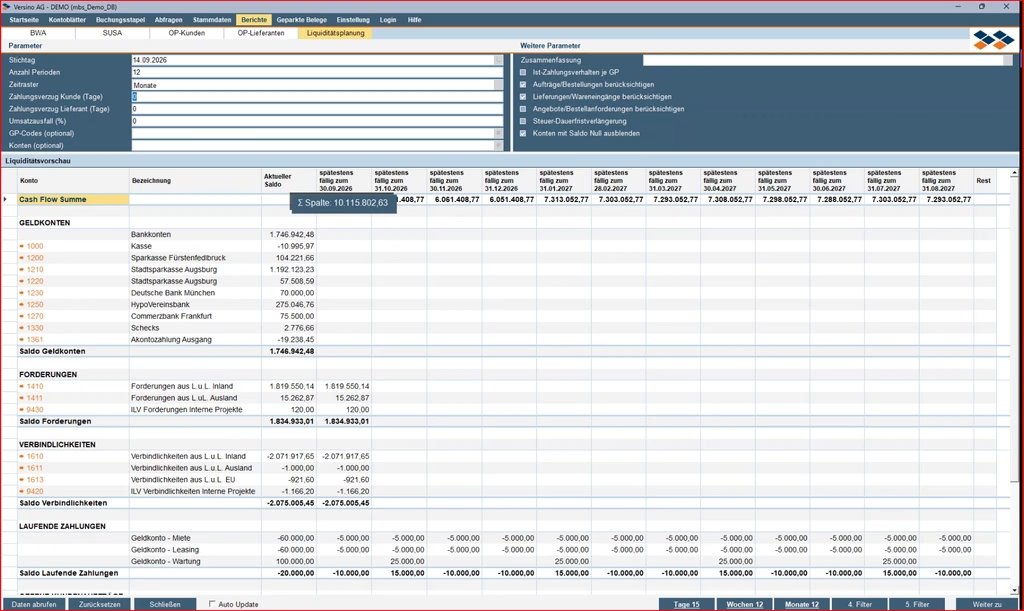
The report starts with a date as the reference point. From there, the number of periods to be looked at in the future can be specified, as well as the time grid: days, weeks, or months.
If you want to keep an eye on the next twelve weeks, choose twelve weeks. If you plan on a daily basis instead, for instance for the coming fifteen days, you get every single day as a separate column. For each period, the first row already shows the expected grand total in the cash accounts at the end of the respective period.
What comes from real bookings
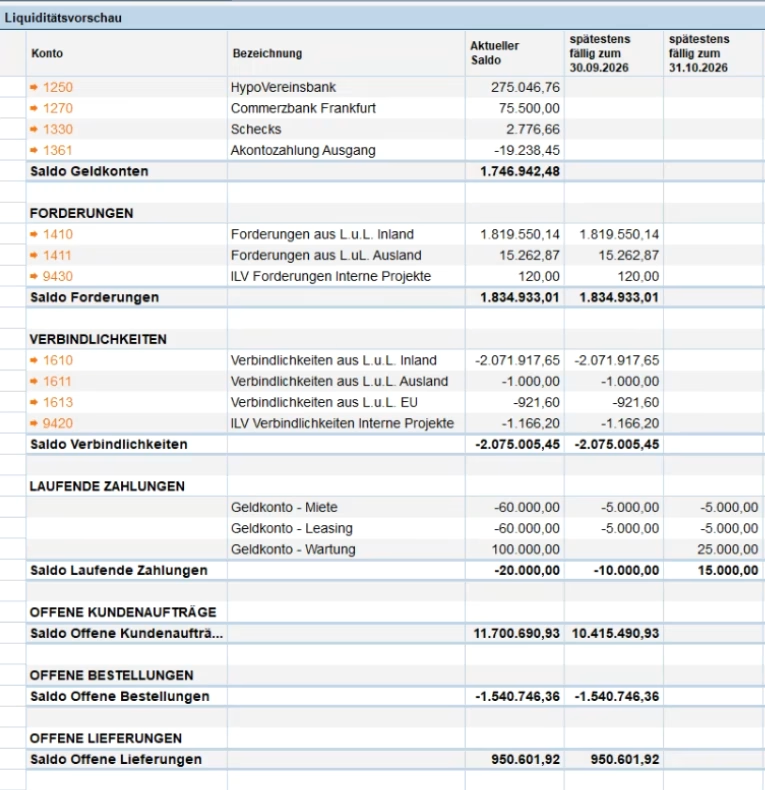
The report starts with the actual values. First, the overview of all accounts marked as cash accounts in SAP Business One, each with their current balance and the grand total across all bank accounts.
This is followed by the trade receivables and trade payables, broken down by general ledger account and with a total sum. Who among the receivables or liabilities a selected line, such as „Domestic receivables“, displays in a sub-report the individual vouchers that make up the total: customer, voucher number, Booking date, due date, amount. The same works for accounts payable.
The monthly tax liability is also incorporated into the planning from real bookings, based on input VAT and output VAT. Anyone who has an extension of the filing deadline can have this taken into account accordingly.
What comes from expectations
Up to this point, the report reflects what is already established. It gets more interesting when it comes to what has not yet been booked as a claim or liability, but is foreseeably going to become one.
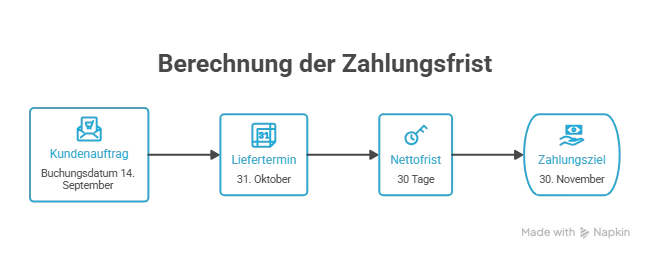
Open sales orders, open purchase orders and open goods receipts eventually lead to an invoice. Liquidity planning therefore uses the planned delivery date of the sales order and the agreed payment term to calculate a potential payment date. An example: a sales order with a booking date of 14 September, a delivery date of 31 October and a net payment term of 30 days. It follows from this that payment is expected at the earliest on 30 November. The same principle applies in the reverse direction for purchase orders to suppliers.
Anyone who does not wish to see open orders and purchase orders can hide them via the parameters. In addition, open quotations and purchase requisitions can also be included, if desired.
Fixed costs and forecasts: two paths, one goal
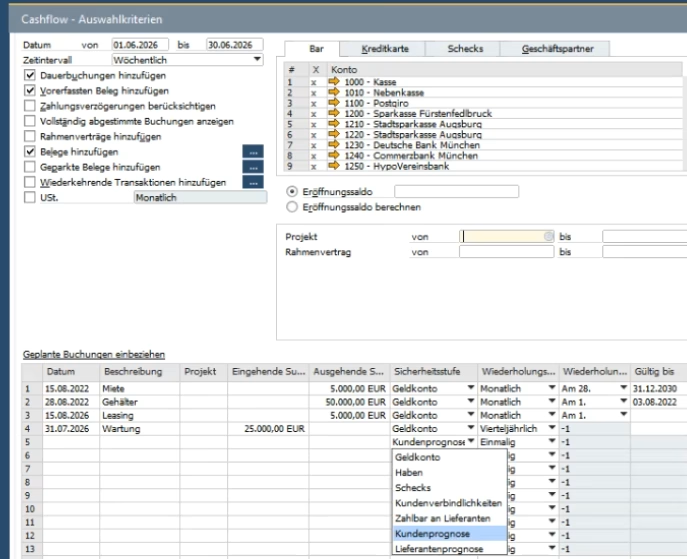
Alongside actual values and expected values derived from documents, liquidity planning includes a third category: values that no one has created as a document in the system because no document exists yet. There are two different maintenance paths for this, which can be combined or used independently of one another.
SAP Business One Standard
Path one extends the standard SAP Business One cash flow report. Planned postings, such as rent, leasing or maintenance contracts, can be stored there, each with a recurrence interval (monthly, weekly, quarterly) and due date. Optionally, a validity period can be set. If this expires, the item is no longer included in the planning.
Versino Financial Suite
Route two is a dedicated table of the Versino Financial Suite named „Planned Payments“. This allows pseudo-receivables and pseudo-payables to be created, optionally linked to a customer, a supplier or a project. The due date and planned amount including tax are specified, either as a recurring payment or as a one-off item, such as a project completion with a subsequent payment term. An example from the video: a customer forecast, originally set at 15,000 euros, later corrected to 18,000 euros because the project volume became more concrete. Here too, this is a demo value, not a real scale.
Free choice
If a planned item becomes obsolete, it can be deleted or temporarily disabled. In both cases, it disappears from the schedule without losing the history.
Both methods can be used separately: fixed costs via the cash flow statement, customer and supplier forecasts via your own spreadsheet. However, they can also both be mapped via the same „Planned Payments“ spreadsheet if that is more practical for your way of working. Which method is better depends on how a company organises its forecast figures anyway.
run through scenarios without changing anything
The report's true strength becomes apparent when you start playing with the parameters. You can adjust how liquidity would develop if receivables were delayed by a certain number of days. Similarly, you can check what happens if payables were settled even a few days late. A potential loss in revenue can also be entered as a percentage, with an immediate impact on the forecast.
These scenarios can additionally be narrowed down to a specific customer or general ledger account. Important to note: none of these scenarios alter real postings. It is purely a what-if analysis based on existing data.
Operation as usual
Anyone who has already dealt with other reports in Financial Cockpit worked, will feel right at home here without needing to adapt. The report can be exported to Excel. Frequently used views can be pre-set using the five filter buttons, such as 15 days, 12 weeks or 12 months, along with two freely configurable filters with individual search criteria. Hovering the mouse over individual columns displays the sum of highlighted values, for instance if you are only interested in certain bank accounts.
An auto-update feature ensures that newly booked invoices or other documents are immediately visible in the current planning without the report having to be completely reloaded.
Who the report is for
Anyone who works exclusively with their current account balance in day-to-day business and has no significant payment terms, lead times or seasonal fluctuations will find little that is new in this report. Its value arises where incoming and outgoing payments diverge in time and where, alongside bookings in the system, projected figures that do not yet exist as a document also play a role.
For managing directors and finance directors who regularly have to calculate back and forth between actual figures and planned figures, whether in Excel or in their heads, the report bundles both in one place. How reliable the forecast ultimately is, however, depends on how accurately payment terms, fixed costs and forecast values are maintained in the system.
If you want to know how liquidity planning can be adapted to your own payment habits and account structures, it is best to discuss this in a specific consultation based on your own data.
Account statement processing: What the Versino Financial Suite will offer in the future — a preview of accounting

E-Invoice check by Versino Financial Suite

Cash flow planning in SAP Business One: What the Versino Financial Suite does differently

Netting in SAP Business One: What makes the Versino Financial Suite different

Trial Balance in SAP Business One: What the Versino Financial Suite does differently – and why tax advisors notice

Versino Financial Suite V09.2025 for SAP Business One

New webinars: Versino Financial Suite