
The annual transfer is a function in SAP Business One for transferring data on the End of a financial year in companies that do not work with a multi-year system.
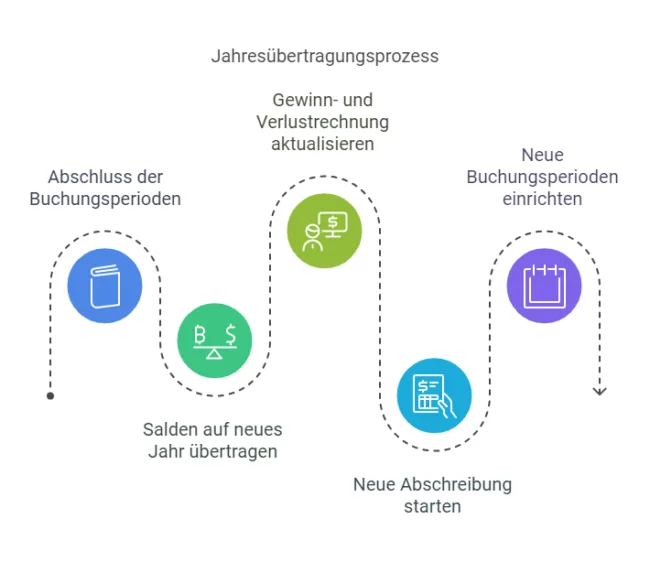
Of the Annual transfer in SAP Business One is an essential process that is carried out at the end of a financial year in order to transfer the financial data for the next financial year. This process ensures the correct continuation of financial accounting.
Steps of the annual carryforward
The annual transfer comprises several key steps:
- Closing of the accounting periods:
Before the start of the annual carryover, all Posting periods of the current financial year. After closing, no further postings are possible in these periods. - Balance carried forward:
The balances of all Balance sheet accounts are automatically carried forward to the new financial year. This ensures that the initial financial position for the new year is correctly reflected. - Profit and loss account:
The balances of all profit and loss accounts are transferred to the account "Retained earnings" in the balance sheet. This ensures that equity is updated in the new financial year. - Asset accounting:
A new depreciation run is started in asset accounting for the new financial year in order to update the values of the fixed assets. - New booking periods:
New posting periods are created for the coming financial year, which record all future postings.
Significance of the annual carryforward
The annual carryforward is a central component of the annual financial statements in SAP Business One. It ensures that:
- The financial data is transferred correctly and without gaps to the new financial year.
- The basis for all further accounting activities in the new year is created.
- A clear conclusion to the old Business year is guaranteed.
The annual transfer to SAP Business One is therefore not only a technical necessity, but also a decisive measure for precise and structured financial accounting.
Versino Financial Suite
the Versino Financial Suite significantly improves and automates the year-end closing process in SAP Business One - from clear visualisation and control to seamless, audit-proof data transfer to the new year. It simplifies closing work, ensures transparency and reduces sources of error by controlling all processes relating to the year-end carryforward centrally and comprehensibly.

E-Invoice check by Versino Financial Suite

Versino accounting service

Cash flow planning in SAP Business One: What the Versino Financial Suite does differently

Two free webinars in July: Experience the Versino Financial Suite live

E-Invoicing 2026: What is changing now for SMEs and SAP B1 users

