An e-invoice can be generated in no time. SAP Business One includes XRechnung as standard, and anyone working with cks.eINVOICE or the Coresuite Designer can also produce the finished file without too much hassle. One click, one document, done. That’s the ideal scenario. In practice, e-invoices rarely fail because of the generation process, but because of their content. The validation process asks for a buyer reference that has never been maintained. It asks for a contact person with a telephone number or for your own IBAN. And it usually only asks for this once the invoice is already on its way. The new e-invoice check in the Versino Financial Suite verifies the e-invoice before it leaves the company.
Read more: E-Rechnungs-Check der Versino Financial SuiteWhy the fault is only noticed once the product reaches the customer
As long as invoices were sent as PDFs, an empty field didn’t bother anyone. A human being can overlook a missing line. A machine cannot. The European standard for e-invoices (EN 16931) and the German XRechnung standard check every mandatory field against fixed rules. If one is missing, the validation fails.
The date from which this applies has been set. If your total turnover in 2026 exceeds 800,000 euros in accordance with Section 19(2) of the German Value Added Tax Act (UStG), you must issue e-invoices from 1 January 2027. If it is below this threshold, the date is 1 January 2028. From your effective date onwards, any gap in the master data will result in an invoice failing the validation check.
What the E-Invoice Check does
What the E-Invoice Check does is a new module in the Versino Financial Suite. It checks an outgoing document before it is converted into an XRechnung or a ZUGFeRD invoice. This could be an invoice, a credit note, a deposit invoice or a draft. You select the document type, enter the document number and start the check by pressing F5. If you leave the number field blank, the module will use the most recent document of that type.
The result is one of three statuses: ready for dispatch, ready for dispatch with warnings, or NOT ready for dispatch. Below this, you’ll find a list of what needs to be added. This is shown field by field, with the current value and the location in SAP where you need to correct it.
Each finding is marked
- CRITICAL: Validation has failed; a required field is missing.
- WARNING: This should be corrected.
- NOTE: Check whether the format mapping correctly reflects the scenario. This refers to the translation of the SAP fields into the XML file.
- OK: Nothing to do.
The module operates in read-only mode. It does not make any changes in SAP.
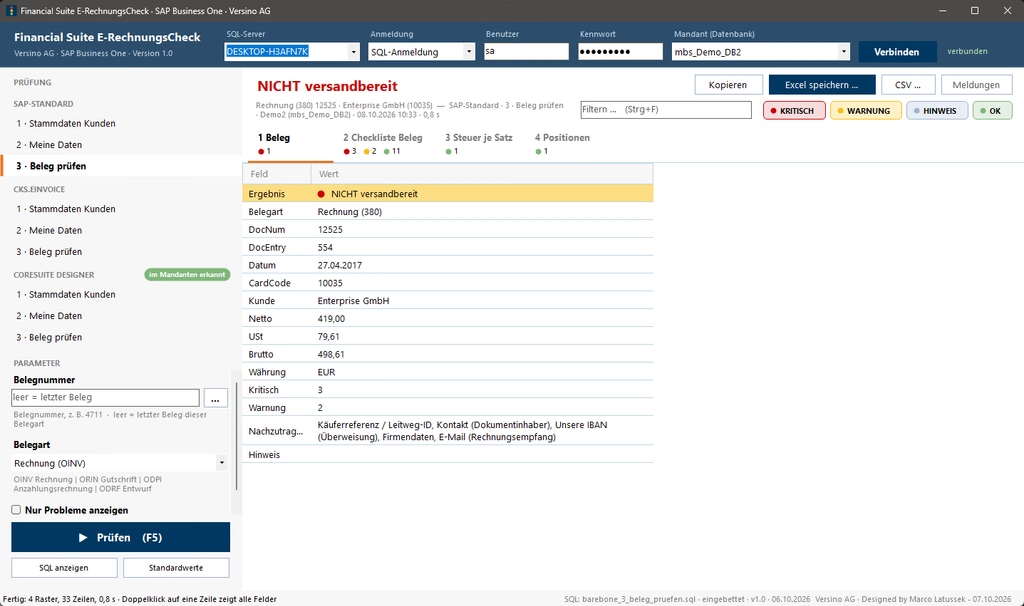
An example from the demo tenant
The screenshot shows an invoice from a demo client to Enterprise GmbH for 498.61 euros gross. The result is: NOT ready for dispatch, three critical issues, two warnings. The following details need to be added: the buyer reference or routing ID, the contact (in this case, the document owner), the company’s own IBAN for the bank transfer, details in the company records, and the customer’s email address for receiving the invoice. The check took 0.8 seconds.
The first point warrants a closer look. The buyer reference is mandatory for the XRechnung, but is irrelevant for VAT purposes. For public authorities, the routing ID should be entered there. In B2B transactions, a simple hyphen is sufficient. A field that is of no interest to the tax authorities yet still holds up every invoice: this is exactly the sort of thing one would rather not find out about from the customer.
Four squares instead of an error message
The results are broken down into four categories:
- Document: Ready for dispatch – yes or no, and what needs to be added.
- Receipt checklist: Reference, seller, buyer, payment, tax and postage.
- Tax per rate: the tax breakdown by tax rate, posted VAT versus calculated VAT.
- Items: each document line with its findings.
Some checks go into greater depth than one might expect from a checklist. The module checks the routing ID not only for presence, but also for structure and checksum. The same applies to IBANs. The sum chain – from net via discount, freight and deposit to gross – must add up. In the line item texts, the module searches for invisible control characters that are not permitted in XML. On paper, nobody notices them.
Special cases are also flagged separately. For example, in the case of a deposit invoice, the module will indicate that the relevant document code is not supported in XRechnung. It is best to clarify the format with the recipient in advance.
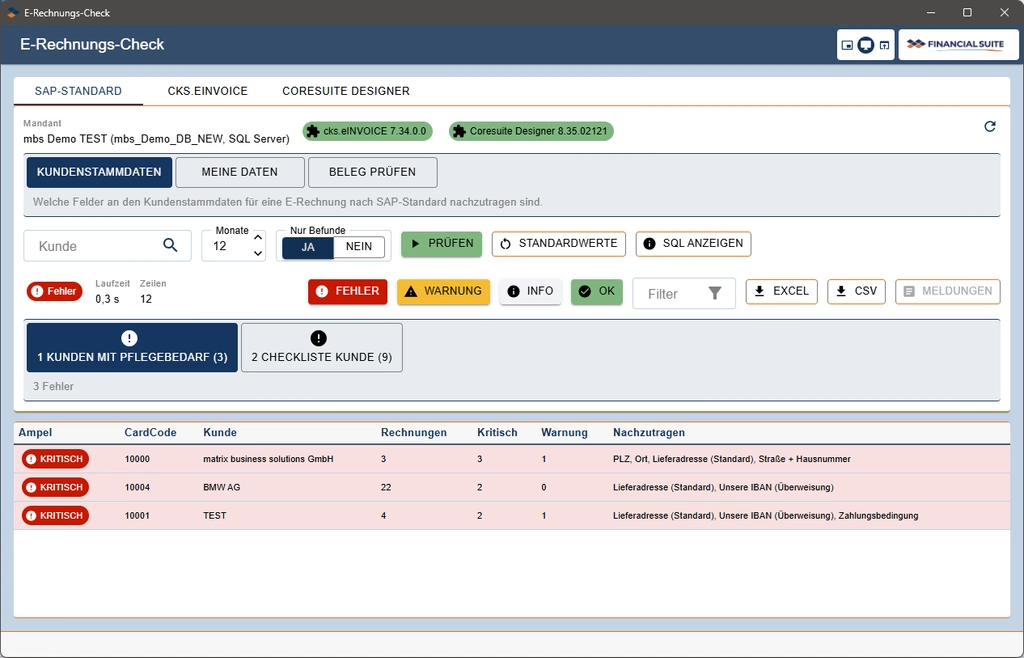
First the master data, then the document
Document verification is the third of three steps. This is preceded by two checks which do not focus on individual documents, but on the overall stock:
- Customer Master Data: Which customers require care? The module displays one row per customer, with the checklist shown field by field below. By default, it only includes customers who have had an invoice in the last twelve months.
- My details: Company details, banks and payment methods, tax groups and seller contact details. In other words, everything that appears as the sender on each of your invoices.
This is where the real leverage lies. A missing contact person in the staff list would otherwise appear on every single invoice. Once you’ve added them, the issue is sorted for all documents relating to that employee. Document verification thus changes from a corrective measure to a final check.
Three test methods, depending on the generator
Where a field should be located depends on who generates the e-invoice. In the standard SAP system, the purchaser reference appears on the document in the customer reference number. cks.eINVOICE first reads the routing ID from a dedicated field in the invoice address and only then from the business partner. For the vendor contact, the standard validation path uses the document owner or, optionally, the sales representative. cks.eINVOICE searches in turn for the sales representative, the document owner and in the company details.
A check that only looks in one place will therefore, in one instance, flag an error that isn’t really an error. In the other, it will overlook one that actually is an error.
That is why the E-RechnungsCheck has separate verification paths: SAP Standard, cks.eINVOICE and Coresuite Designer, each comprising the three steps: Customer Master Data, My Data and Check Document. The cks process reads the values in the same way as cks.eINVOICE does. It also displays a fifth table containing the cks log for the document. If cks.eINVOICE is not installed in the client, the module indicates this and refers the user to the SAP Standard.
If you want to know exactly what is being checked, you can have a look: behind each step is an SQL query, which you can view by selecting ‘Show SQL’. You can save the results as an Excel or CSV file and pass them on to the person responsible for maintaining the master data.
What the check does not replace
However thorough it may be, the E-Invoice Check verifies the data in SAP, not the final XML file. Some findings therefore conclude with a recommendation to validate a test invoice. This applies, for example, to cash discounts, header discounts involving multiple tax rates, or amounts with more than two decimal places. Only the validation of a genuine test invoice will reveal whether the format mapping correctly handles such cases.
The check ensures that this validation does not fail due to issues that could have been spotted beforehand. It is less spectacular than a new format, but considerably more useful.
Who would benefit from the E-Invoice Check
This check is well worth it for businesses that use SAP Business One to issue invoices to other companies or public sector clients. It helps the accounts team spot errors before the invoices are sent out, rather than after. It helps the commercial management team, who want to know how far along the data actually is before the deadline. And it helps the IT team, who receive a clear, organised list rather than a series of individual requests.
Ultimately, an e-invoice is only as good as the data that’s already in SAP. Knowing this before the customer tells you isn’t a luxury. It’s simply the more cost-effective way of doing things.
Legal status: July 2026 (Federal Ministry of Finance, FeRD). Module version: Versino Financial Suite E-RechnungsCheck, Version 1.0.Further information: The basics regarding the e-invoicing obligation have already been outlined elsewhere in the blog: E-Invoicing 2026: What is changing now for SMEs and SAP B1 users and E-Invoicing 2026: From Receipt to Mandatory Issuance — what SMEs must clarify now.

E-Invoice check by Versino Financial Suite

Cash flow planning in SAP Business One: What the Versino Financial Suite does differently

Netting in SAP Business One: What makes the Versino Financial Suite different
Trial Balance in SAP Business One: What the Versino Financial Suite does differently – and why tax advisors notice

Versino Financial Suite V09.2025 for SAP Business One

New webinars: Versino Financial Suite

Secure liquidity with SAP Business One